Flight status

Helping travellers understand their flight when timing matters most.

Client

Porter Airlines

Team

Me (Product designer)

1 UX Designer

4 Developers

1 Business analyst

1 CX lead

Skills / Tools

Figma

User research

Design systems

Userlytics

Timeline

Aug - Dec 2025

STATUS

Handed off

PROBLEM area

When flights were unclear, so were travellers

Flight Status is Porter's second-most used flow after booking a flight, averaging ~1.25 million site visits per month. It serves as a critical checkpoint for passengers to validate what’s happening to their flight so they can plan their journey. However, the flow wasn't optimized for readability or speed, making a tense moment even more stressful. Here's how we changed that.

Flight Status is Porter's second-most used flow after booking a flight, averaging ~1.25 million site visits per month. It serves as a critical checkpoint for passengers to validate what’s happening to their flight so they can plan their journey. However, the flow wasn't optimized for readability or speed, making a tense moment even more stressful. Here's how we changed that.

1

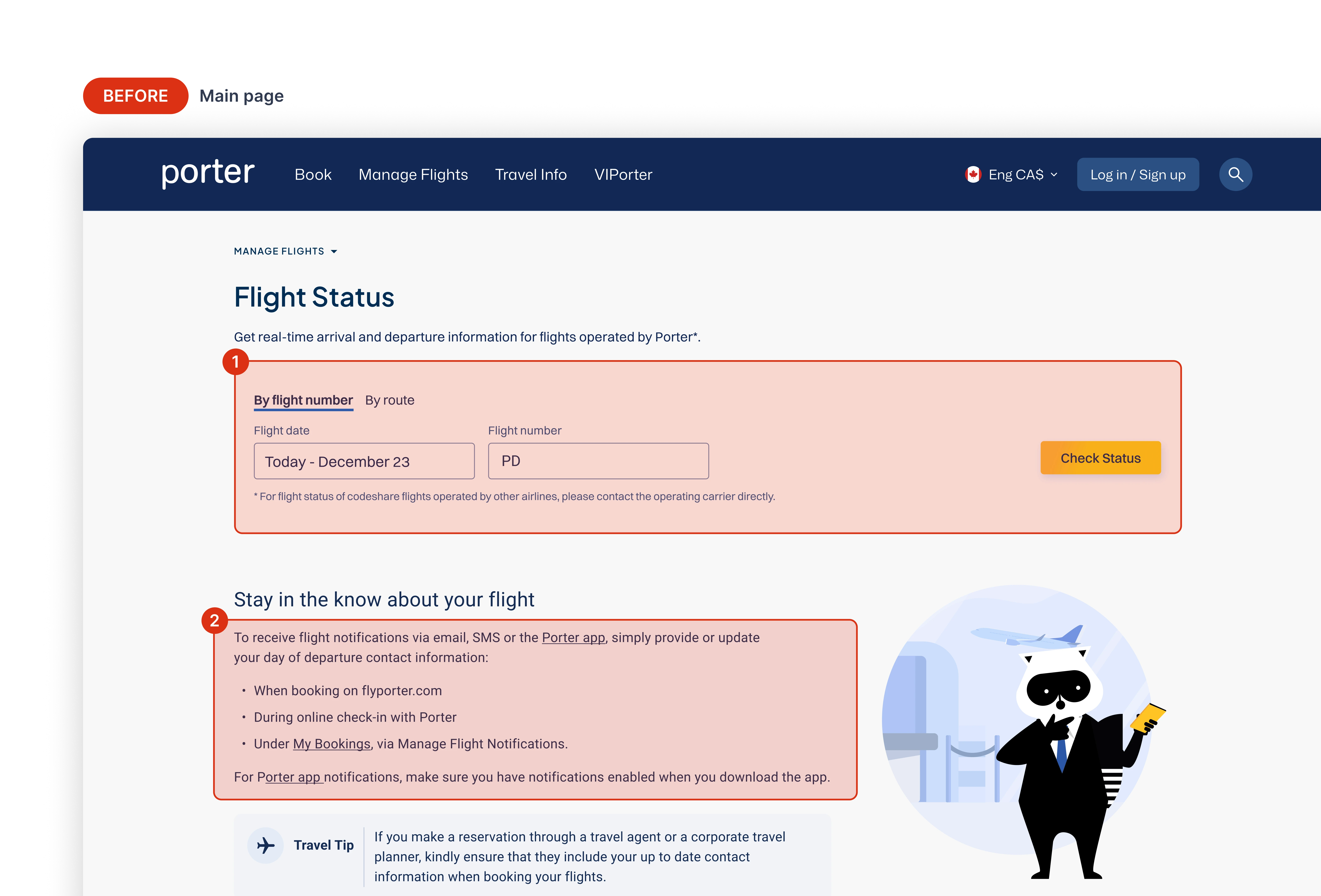
Poor grouping between key actions harms usability, adding confusion to an already tense moment

2

Secondary information clutters the page, removing the user's focus from primary actions

3

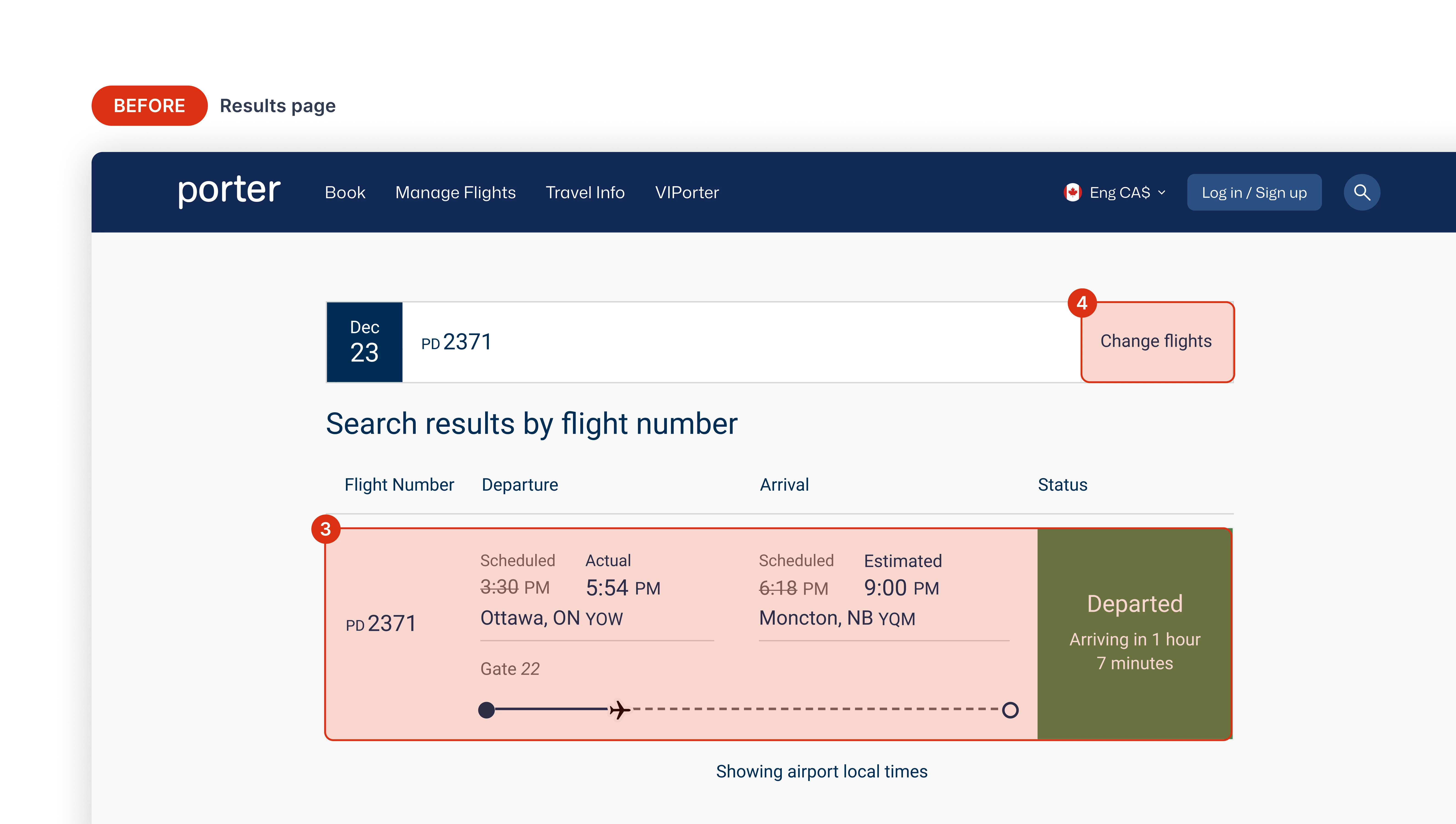
Competing system states and dated layouts fail to quickly add clarity about what the user searched

4

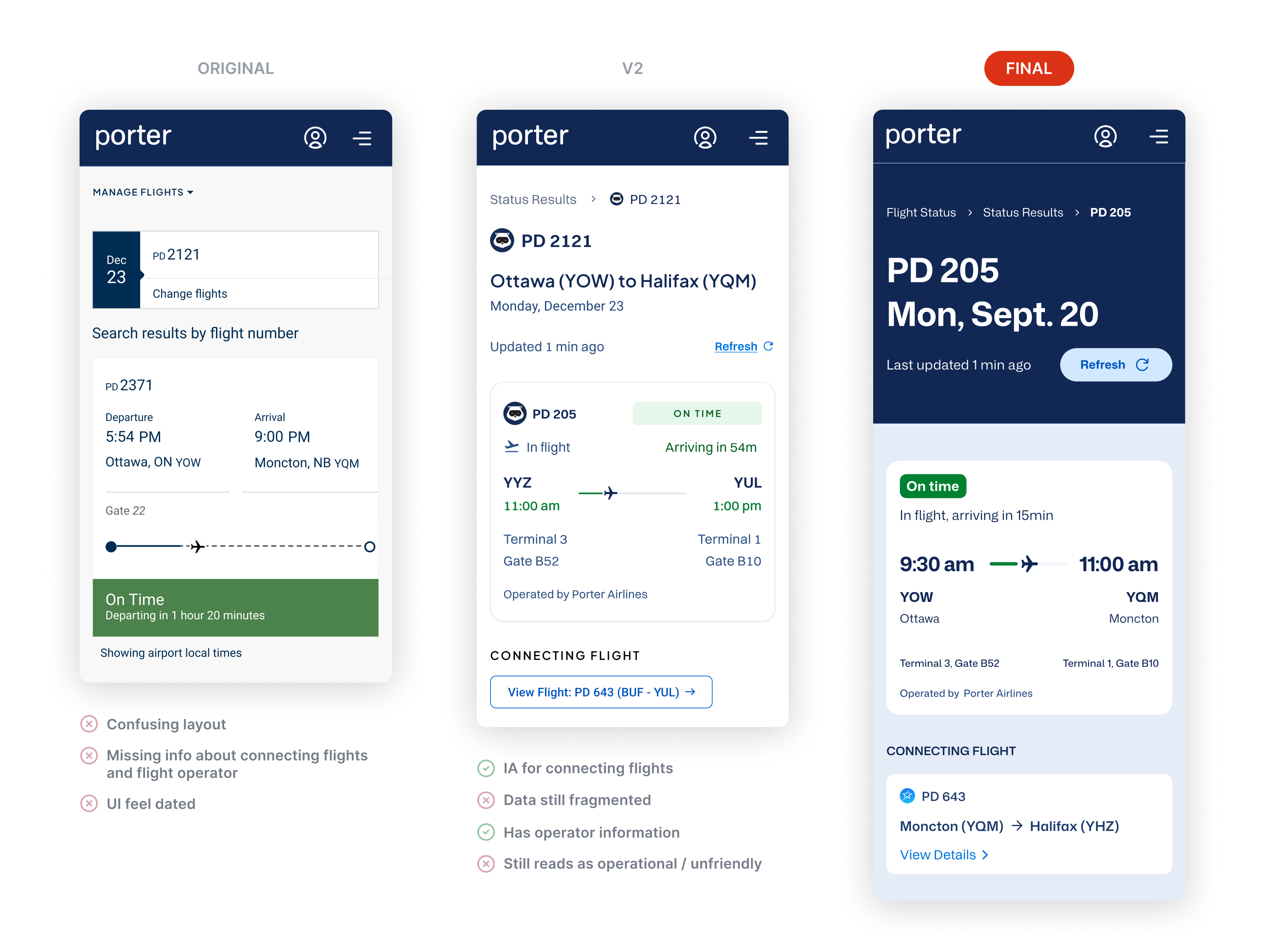
Ineffective architecture made users search for connecting flights manually, leaving them in the dark

DESIGN GOALS

What I aimed to achieve

Build trust and confidence

Tell a clear, factual story about what’s happening, and support travellers with insightful info and actions.

Optimize for stress

Make interactions friendlier, layouts more scannable to tell a clear, quick-to-digest journey to users.

Modernize the experience

Align visuals with refreshed brand assets and rebuild the flow using Porter’s new design system.

DECISION 1

Design mobile-first for real world usage

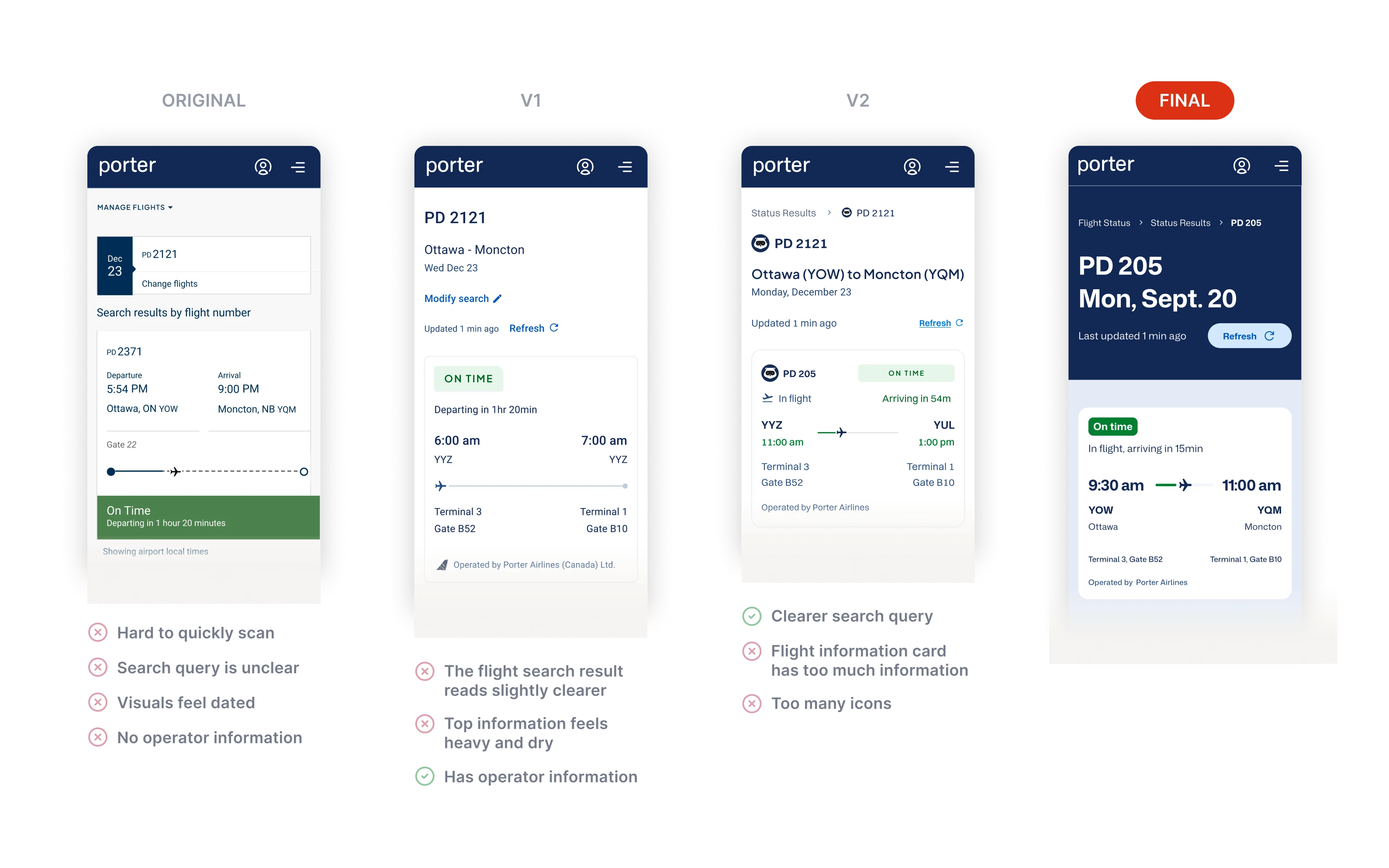
Travellers often check Flight Status on the go, between gates, connections, or sudden plan changes. In these moments, showing all possible flight data creates friction instead of confidence. I deliberately prioritized scanability over completeness by restructuring the layout to surface status, timing, and direction first, and introducing color-coded progress indicators for instant scanning. This shift made the experience decision-ready, giving travellers clarity before detail.

DECISION 2

Clearly show connecting flights

Throughout the project, requirements changed and new constraints were uncovered. Victoria and I learned that our backend could not reliably tell whether a traveller would continue on a connecting flight or end their trip at a layover, since through-flights can share the same aircraft and route. For example, a flight from Ottawa to Halifax might stop in Moncton, but not every passenger would continue past that point. Because of this limitation, we needed to design a seamless way to show the next leg of the journey, whether or not the traveller was actually taking it, so I decided to include it beneath the main flight search.

DECISION 3

Delineate actions from info

I wanted there to be a clear distinction of the page's main elements and supplementary information, so I decided to use the brand's dark blue for the main area to command the user's attention, and chunk potentially relevant info in cards below.

DECISION 4

Sprinkle in delight to get people to learn

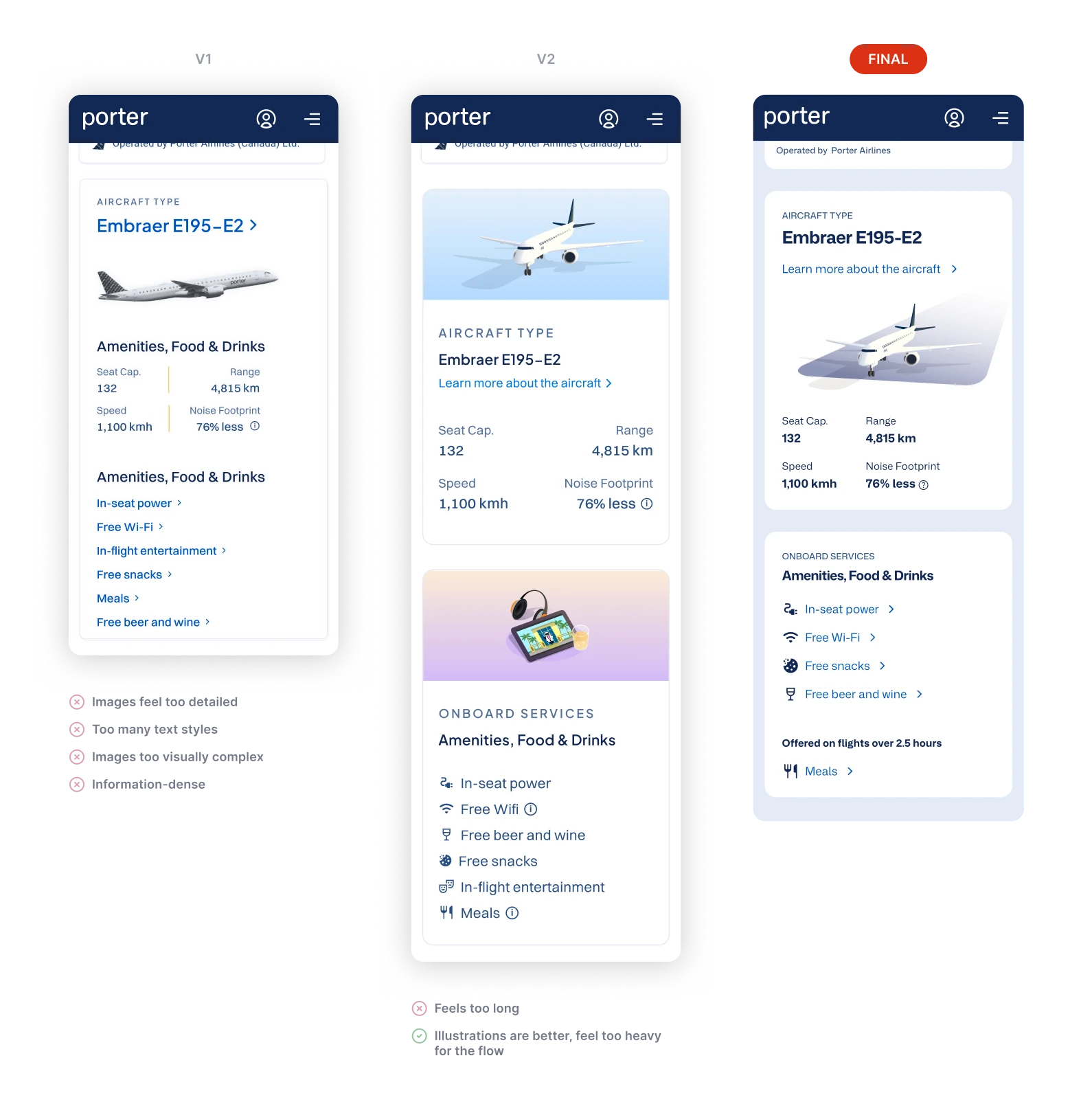
Early on, Victoria and I were encouraged to look at the whole user journey. While we were conducting competitor analysis, we noted Air Canada and Flighty giving some extra info. I advocated adding in information the plane and its services to enhance brand awareness, and potentially help people recognize our planes in the airport, and it tested incredibly well.

RETROSPECTIVE

Results & insights

Try prototype

A measurably easier flow with strong user preference

During user testing, 100% (out of 5 users) of users were successful in finding their flight. Also, all five users rated the redesign's visual clarity and ease of use higher than the older designs. There's also a potential increase in brand reputation with the inclusion of the aircraft and onboard services.

Mentoring designers with design system to work faster

I mentored Victoria on using the Porter Design System's components, teaching her to use the new components and helping her create layouts and better understand how UIs are developed. Nearing the end of the project, I conducted a design challenge were I challenged her to make two identical screens using the design system, and not. Using the design system, she replicated the screen 20% faster, showing how it can speed up the design workflow even with baseline knowledge.

I mentored Victoria on using the Porter Design System's components, teaching her to use the new components and helping her create layouts and better understand how UIs are developed. Nearing the end of the project, I conducted a design challenge were I challenged her to make two identical screens using the design system, and not. Using the design system, she replicated the screen 20% faster, showing how it can speed up the design workflow even with baseline knowledge.

"Oh, this plane info section is fun!"

The quote is from one of our usability testers. I was glad to see users highlighting the value add for both the plane information and amenities sections. There's potential for a positive impact on brand perception and customer awareness of service offerings due to this fun additional info, especially as the airline grows and and adds more plane types to their fleet.

Metrics I'd like to measure

We didn't have quantifiable data on the percentage of support calls that are about flight status. Measuring the rates before and after the flow is launched would be an interesting way to measure the financial success of the flow's redesign, as the business cost of these types of calls are easily-preventable.

What I'd like to see next

When looking at the customer journey, I thought leveraging iOS Live Activities through our app could further simplify the user experience: surfacing this data for users before they even opened their phones. As the web and app teams at Porter work separately, I pitched this idea to the mobile app lead, and they said they would investigate adding it in, technically-permitting.

NEXT PROJECT

Porter Design System

NEXT PROJECT

Porter Design System